Drag&Drop корзина для покупок на JQuery
Существует достаточно много руководств о создании корзины для покупок, но в этом посте вы увидите версию drag&drop корзины покупок на JQuery. Пример реализован только для стороны клиента. Данные о товарах будут хранится в HTML. Drag&drop, подсчет цены и количества вещей реализован через javascript.
Drag&drop реализован через JQuery UI. Он будет использоваться на списке товаров и на списке для корзины.
HTML
Список товаров
Как уже упоминалось раньше, в руководстве не будет информации о кодировании на стороне сервера. Код только для списка товаров на 10 позиций, но в коде ниже показано всего 2 позиции для простоты.
Корзина
В корзине будут показываться товары, которые перенесут из списка товаров, также в ней будет отображаться общая цена и количество товаров.
JQuery
Инициализация корзины
Для начала инициализируем товары из списка, чтобы можно было их перетаскивать в корзину, также функционал пересчета общей цены и количества товаров в корзине и удаление каждого товара из корзины.
Удаление товара
При удалении товара из корзины цена и количество товаров будет обновлено и конечно же сам товар удален.
Навигация корзины
Перетаскивание и удаление товаров из корзины не единственные с ней манипуляции, кроме того можно прокручивать список товаров назад и вперед, для этого встроим в нее две кнопки навигации, которые будут изменять свойство left из CSS.
CSS
Результат вы можете увидеть ниже.
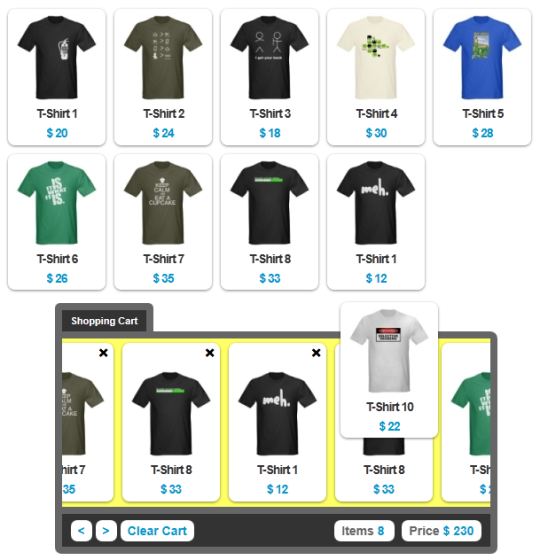
Drag&drop реализован через JQuery UI. Он будет использоваться на списке товаров и на списке для корзины.
HTML
Список товаров
Как уже упоминалось раньше, в руководстве не будет информации о кодировании на стороне сервера. Код только для списка товаров на 10 позиций, но в коде ниже показано всего 2 позиции для простоты.
<div id="item_container">
      <div class="item" id="i1">
          <img src="img/1.jpg"/>
          <label class="title">T-Shirt 1</label>
          <label class="price">$ 20</label>
      </div>
      <div class="item" id="i2">
          <img src="img/2.jpg"/>
          <label class="title">T-Shirt 2</label>
          <label class="price">$ 24</label>
      </div>
      <div class="clear"></div>
  </div>
Корзина
В корзине будут показываться товары, которые перенесут из списка товаров, также в ней будет отображаться общая цена и количество товаров.
<div id="cart_container">
  <div id="cart_title">
      <span>Shopping Cart</span>
      <div class="clear"></div>
  </div>
  <div id="cart_toolbar">
      <div id="cart_items" class="back"></div>
  </div>
  <div id="navigate">
      <div id="nav_left">
          <a href="" id="btn_prev"><</a>
          <a href="" id="btn_next">></a>
          <a href="" id="btn_clear">Clear Cart</a>
      </div>
      <div id="nav_right">
          <span class="sptext">
              <label>Items </label><label class="count" id="citem">0</label>
          </span>
          <span class="sptext">
              <label>Price </label><label class="count" id="cprice">$ 0</label>
          </span>
      </div>
      <div class="clear"></div>
  </div>
</div>
JQuery
Инициализация корзины
Для начала инициализируем товары из списка, чтобы можно было их перетаскивать в корзину, также функционал пересчета общей цены и количества товаров в корзине и удаление каждого товара из корзины.
var total_items = 0;
var total_price = 0;
$(document).ready(function() {
$(".item").draggable({
revert: true
});
$("#cart_items").draggable({
axis: "x"
});
$("#cart_items").droppable({
accept: ".item",
activeClass: "drop-active",
hoverClass: "drop-hover",
drop: function(event, ui) {
var item = ui.draggable.html();
var itemid = ui.draggable.attr("id");
var html = '<div class="item icart">';
html = html + '<div class="divrm">';
html = html + '<a onclick="remove(this)" class="remove '+itemid+'">×</a>';
html = html + '<div/>'+item+'</div>';
$("#cart_items").append(html);
// обновления общего количества
total_items++;
$("#citem").html(total_items);
// обновление общей цены
var price = parseInt(ui.draggable.find(".price").html().replace("$ ", ""));
total_price = total_price + price;
$("#cprice").html("$ " + total_price);
// разворачиваем товары в корзине
if (total_items > 4) {
$("#cart_items").animate({width: "+=120"}, 'slow');
}
}
});
});Удаление товара
При удалении товара из корзины цена и количество товаров будет обновлено и конечно же сам товар удален.
function remove(el) {
    $(el).hide();
    $(el).parent().parent().effect("highlight", {color: "#ff0000"}, 1000);
    $(el).parent().parent().fadeOut('1000');
    setTimeout(function() {
        $(el).parent().parent().remove();
        if (total_items > 3) {
            $("#cart_items").animate({width: "-=120"}, 'slow');
        }
    }, 1100);

    // обновление количества
    total_items--;
    $("#citem").html(total_items);
    // обновление общей цены
    var price = parseInt($(el).parent().parent().find(".price").html().replace("$ ", ""));
    total_price = total_price - price;
    $("#cprice").html("$ " + total_price);
}
Навигация корзины
Перетаскивание и удаление товаров из корзины не единственные с ней манипуляции, кроме того можно прокручивать список товаров назад и вперед, для этого встроим в нее две кнопки навигации, которые будут изменять свойство left из CSS.
$("#btn_next").click(function() {
    $("#cart_items").animate({left: "-=100"}, 100);
    return false;
});
$("#btn_prev").click(function() {
    $("#cart_items").animate({left: "+=100"}, 100);
    return false;
});
$("#btn_clear").click(function() {
    $("#cart_items").fadeOut("2000", function() {
       $(this).html("").fadeIn("fast").css({left: 0});
    });
    $("#citem").html("0");
    $("#cprice").html("$ 0");
    total_items = 0;
    total_price = 0;
    return false;
});
CSS
body {
    font-family: Arial, "Free Sans";
    margin: 0;
    padding: 0;
}
#item_container {
    width: 610px;
    margin: 0 auto;
    margin-top: 10px;
    margin-bottom: 10px;
}
.item {
    background: #fff;
    float: left;
    padding: 5px;
    margin: 5px;
    cursor: move;
    -webkit-box-shadow: 0 1px 2px rgba(0,0,0,.5);
    -moz-box-shadow: 0 1px 2px rgba(0,0,0,.5);
    box-shadow: 0 1px 2px rgba(0,0,0,.5);
    -webkit-border-radius: .5em;
    -moz-border-radius: .5em;
    border-radius: .5em;
    z-index: 5;
}
.title, .price {
    display: block;
    text-align: center;
    font-size: 14px;
    letter-spacing: -1px;
    font-weight: bold;
    cursor: move;
}
.title {
    color: #333;
}
.price {
    color: #0099cc;
    margin-top: 5px;
    -webkit-border-radius: .5em;
    -moz-border-radius: .5em;
    border-radius: .5em;
}
.icart, .icart label {
    cursor: e-resize;
}
.divrm {
    text-align: right;
}
.remove {
    text-decoration: none;
    cursor: pointer;
    font-weight: bold;
    font-size: 20px;
    position: relative;
    top: -7px;
}
.remove:hover {
    color: #999;
}
.clear {
    clear: both;
}
#cart_container {
    margin: 0 auto;
    width: 495px;
}
#cart_title span {
    border: 8px solid #666;
    border-bottom-width: 0;
    background: #333;
    display: block;
    float: left;
    color: #fff;
    font-size: 11px;
    font-weight: bold;
    padding: 5px 10px;
    -webkit-border-radius: .5em .5em 0 0;
    -moz-border-radius: .5em .5em 0 0;
    border-radius: .5em .5em 0 0;
}
#cart_toolbar {
    overflow: hidden;
    border: 8px solid #666;
    height: 190px;
    z-index: -2;
    width: 483px;
    -webkit-border-radius: 0 .5em 0 0;
    -moz-border-radius: 0 .5em 0 0;
    border-radius: 0 .5em 0 0;
    background: #ffffff;
}
#cart_items {
    height: 190px;
    width: 483px;
    position: relative;
    padding: 0 0 0 2px;
    z-index: 0;
    cursor: e-resize;
    border-width: 0 2px;
}
.back {
    background: #e9e9e9;
}
#navigate {
    width: 463px;
    margin: 0 auto;
    border: 8px solid #666;
    border-top-width: 0;
    -webkit-border-radius: 0 0 .5em .5em;
    -moz-border-radius: 0 0 .5em .5em;
    border-radius: 0 0 .5em .5em;
    padding: 10px;
    font-size: 14px;
    background: #333;
    font-weight: bold;
}
#nav_left {
    float: left;
}
#nav_left a {
    padding: 4px 8px;
    background: #fff;
    -webkit-border-radius: .5em;
    -moz-border-radius: .5em;
    border-radius: .5em;
    text-decoration: none;
    color:#0099cc;
}
#nav_left a:hover {
    background: #666;
    color: #fff;
}
#nav_right {
    float: right;
}
.sptext {
    background: #ffffff;
    padding: 4px 8px;
    margin-left: 8px;
    -webkit-border-radius: .5em;
    -moz-border-radius: .5em;
    border-radius: .5em;
    color: #666;
}
.count {
    color: #0099cc;
}
.drop-active {
    background: #ffff99;
}
.drop-hover {
    background: #ffff66;
}
Результат вы можете увидеть ниже.
Теги:
Похожие новости:
Комментарии:
Нету комментариев для вывода...